
My Exchange
Army & Air Force Exchange ServiceShopping
3.496.00 Reviews
- Version
- 1.0.8
- Installs
- 50.00K
- Age Rating
- Everyone
Screenshots
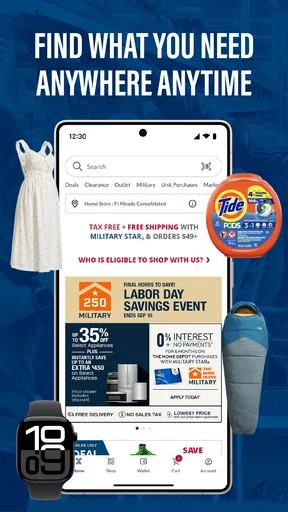
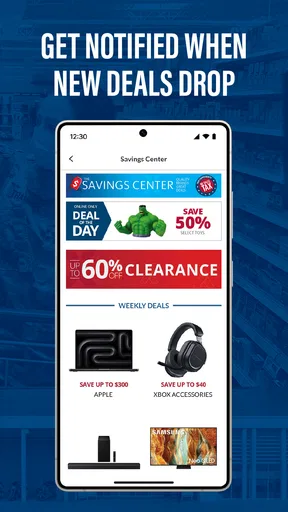
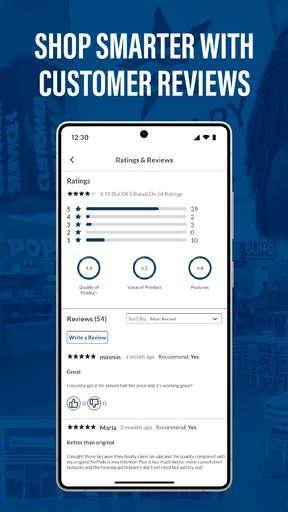
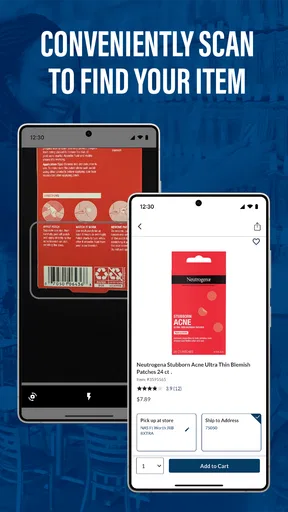
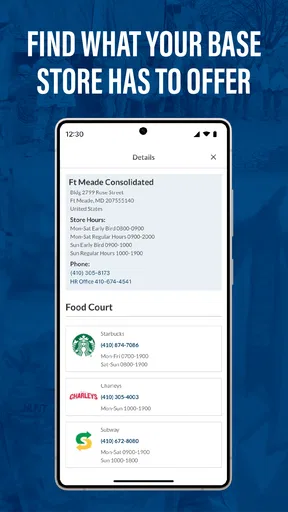
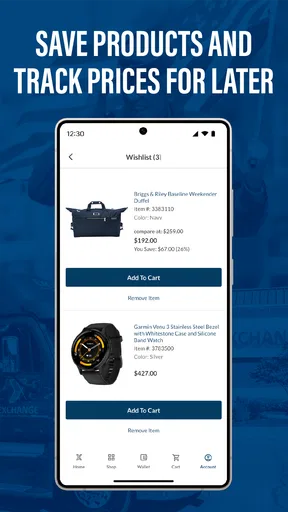
Our Review of My Exchange
 Analysis by Appyee
Shopping apps usually try to win me over with speed, huge catalogs, or constant promotions. My Exchange takes a different route: its central purpose is giving eligible military shoppers a more direct way to use their exchange benefit from a phone. That focus makes it easier to understand than a general marketplace, but it also means its value depends heavily on whether you are part of the audience it serves.
I reviewed it as a free shopping app from Army & Air Force Exchange Service, currently listed as version 1.0.8. It is rated for Everyone, and the app has reached over 50 thousand installs. Those figures suggest a useful but still relatively focused service rather than an all-purpose shopping destination. My honest view is that the benefit-focused approach is the reason to install it; if you are looking for ordinary online shopping without a military connection, this is probably not the right tool.
Putting the military benefit at the center of shopping
The most important capability here is not simply browsing products on a smaller screen. It is the attempt to place the exchange shopping experience in a mobile format, where an eligible user can begin from a phone instead of treating the exchange as something tied only to a physical location or a desktop browser. That distinction matters when shopping is part of a busy day rather than a planned outing.
In practical terms, I see this app as a companion for people who already understand the exchange and want a more convenient digital entry point. The developer is Army & Air Force Exchange Service, so the app has a clearly defined audience instead of pretending to serve every type of shopper equally. That clarity is helpful: you can decide quickly whether the service belongs in your routine.
The app is free to install, which removes the first barrier to trying it. Its average rating is 3.4 from around 150 ratings, with close to 100 written reviews. I would read that as a sign to keep expectations measured. It is not an app I would recommend blindly on the strength of its rating alone, but neither is the score a reason to dismiss a focused shopping tool that may solve a specific problem for you.
What I like about this positioning is that it keeps the benefit in view. A general retailer may offer more categories, more polished discovery tools, or a larger shopping ecosystem, but it does not replace the exchange relationship. My Exchange is more relevant when the question is, “How can I make better use of this particular military shopping option?” rather than, “Where can I buy anything at all?”
What the app changes for a regular shopper
The biggest change is one of access and attention. Instead of opening a browser, searching for the exchange site, and then working through a larger web experience, a dedicated app gives the service a permanent place on the phone. That sounds small, but repeated small conveniences are exactly what make an app worth keeping.
I also think the dedicated format can help users separate exchange shopping from the noise of mainstream retail. General shopping apps are designed to pull you toward recommendations, unrelated sales, and impulse purchases. A benefit-centered app has a narrower job. For someone who wants to check the exchange first, that narrower job can be a strength.
There is a trade-off, though. A focused app is only as useful as the shopping functions it makes easy. If you expect the broad comparison tools, deep personalization, or frictionless checkout habits of major retail platforms, you may find the experience less comprehensive. I would install it for access to the exchange benefit, not because I expect it to replace every other shopping app on my phone.
Using it in an ordinary day
Imagine a service member or military family member preparing for a move. The day is already divided between work, packing, appointments, and household errands. Rather than making a separate trip just to begin shopping, the person can open My Exchange during a break and use the mobile service as the starting point for exchange purchases. That is the kind of situation where the app makes sense: the benefit is already relevant, but time and location make a phone-based option more practical.
I would use a similar workflow when planning a household purchase. First, I would decide whether the item is something I specifically want to buy through the exchange. Then I would open the app before defaulting to a general retailer. This small change in habit is one of the app’s more valuable effects. It encourages eligible shoppers to remember the exchange as an active option rather than treating it as a backup after searching everywhere else.
Another useful habit is to open the app with a clear purpose. Because shopping apps can easily turn a simple need into extended browsing, I would begin with the item or category I have in mind, check the available exchange route, and then compare the overall convenience with alternatives. That approach keeps the military benefit central without assuming that every purchase will be best handled in the app.
For families sharing shopping responsibilities, the phone format may also be convenient when one person is away from an exchange location and another is handling errands. I would not treat the app as a replacement for discussing household needs, but it can make the exchange option easier to consider during those conversations. The practical advantage is less about entertainment and more about reducing the number of steps between deciding to shop and actually starting.
Where it is stronger than usual alternatives
Compared with visiting a physical exchange, the app is more convenient when you are not already near a store or when your schedule is too crowded for an extra stop. Compared with a mobile browser, a dedicated app should feel more direct because the exchange has its own place on your device. Those are meaningful advantages for an eligible user who already intends to shop through the exchange.
Compared with a large general marketplace, however, the comparison is more complicated. A mainstream retailer may be better for broad product discovery, side-by-side research, delivery preferences, or a familiar checkout routine. It may also be the faster choice when you simply need a common item and do not care which retail channel provides it. My Exchange wins when the exchange benefit is part of the decision, not when the only goal is maximum marketplace breadth.
I would also distinguish it from price-comparison tools. A comparison service helps answer, “Who sells this for the least or with the easiest delivery?” My Exchange answers a different question: “Can I shop through my exchange channel from this device?” Those purposes can coexist. I would use a comparison habit for expensive or widely available products, then decide whether the exchange option offers the better overall fit for my situation.
Small workflow choices that make it more useful
The first tip is to make the app part of the beginning of your shopping process, not the last step. If you search general marketplaces first, you may already have settled on a product before considering the exchange. Opening My Exchange first gives its benefit a fair chance to influence the purchase.
The second is to use it for planned shopping rather than aimless browsing. A written list, even a short one, helps reveal whether the app is saving time or merely adding another place to look. This is especially useful for households that already use several retail services and want to know whether the exchange deserves a regular place in the routine.
The third is to separate eligibility from convenience in your decision. Being part of the intended audience makes the app relevant, but relevance does not mean every purchase belongs there. For a product that requires extensive research, urgent delivery, or a very specific retailer, another service may still be better. I see the app as a first stop for exchange-related shopping, not an instruction to abandon every alternative.
A fourth insight is that the app’s value can increase through repetition. The first use may feel like merely installing another shopping tool. After several shopping occasions, the real benefit is remembering the exchange automatically when a need comes up. That behavioral shortcut is more important than any single browsing session because it can prevent the exchange option from being overlooked.
Where the experience may create friction
The narrow audience is the clearest limitation. If you are not eligible for the military shopping benefit, the app has little reason to remain installed. Even for eligible users, it may not be the best choice for every purchase. A focused service cannot automatically match the selection, research depth, or delivery flexibility people may expect from the biggest commercial platforms.
The rating also tells me to approach the experience with patience. With a 3.4 average, I would not assume that every part of the journey feels equally smooth for every user. A shopping app needs to make basic actions feel dependable, and any hesitation around finding products, moving through the purchase process, or returning later can undermine the convenience it is meant to provide.
That does not make the app a poor choice; it changes how I would use it. I would keep a general retailer available for comparison and for purchases where speed or selection matters more. I would also avoid making a time-sensitive purchase depend on a new app until I had personally become comfortable with its flow. That is sensible with any shopping service, especially one whose current version is still identified as 1.0.8.
Another trade-off is mental clutter. Every additional shopping app competes for attention, and not everyone wants a separate application for a specialized retail relationship. If you only shop through the exchange occasionally, opening a browser may feel sufficient. The dedicated app becomes easier to justify when you use the benefit often enough that fast access saves real effort.
Who gets the most from keeping it installed
The strongest audience is eligible military shoppers who want the exchange to be part of their normal mobile shopping routine. That includes people who live far from an exchange location, households that plan purchases around busy schedules, and users who want to check the exchange before turning to general retail apps.
It is also a good fit for anyone trying to make a more deliberate shopping habit. Instead of automatically opening the largest marketplace, you can begin with the service connected to your military benefit and then compare only when needed. That workflow respects both convenience and choice, which is more realistic than treating one app as the answer to every purchase.
I would be less enthusiastic for occasional shoppers who already have a browser workflow they prefer. I would also suggest skipping it if your shopping needs are mostly unrelated to the exchange or if you depend on features that are normally associated with broad commercial marketplaces. The app’s strength comes from its specific purpose, so using it outside that purpose will make it feel limited.
The Everyone age rating makes it approachable from an app-store perspective, but the practical audience is still defined by the military benefit rather than by age alone. That is an important distinction. A family may share an interest in exchange shopping, yet the person installing the app should still understand why the service is relevant to them before expecting it to function like an ordinary retail marketplace.
My recommendation after using the focused approach
I recommend My Exchange to eligible users who want a convenient mobile doorway into Army & Air Force Exchange Service. I would not recommend it as a universal shopping replacement, because that is not where its advantage lies. Its best quality is the way it keeps a specific military shopping benefit close at hand and makes it easier to consider during everyday purchasing decisions.
The app is free, so trying it carries little financial risk. Still, I would judge it by a practical test: install it, use it for a planned exchange-related purchase, and notice whether it genuinely reduces the steps you normally take. If it becomes the first place you check, it has earned its space. If you continue to prefer a browser or another retailer for nearly everything, uninstalling it is a reasonable conclusion.
My final opinion is cautiously positive. The 50-thousand-plus install base and the 3.4 average rating point to a specialized app with room to win users through reliability and convenience rather than broad appeal. For the right shopper, the focused benefit is more valuable than a long list of unrelated shopping features. For everyone else, a general marketplace will usually be the more useful everyday option.
If you are eligible and regularly think about where the exchange fits into your household shopping, I think My Exchange is worth testing. I would keep expectations grounded, compare it with your usual options when the purchase matters, and let repeated real-world use decide whether it belongs in your routine.
Verdict
Strengths of My Exchange
- Simple interface makes currency conversion quick to understand.
- Supports comparing exchange rates for different currencies.
- Useful for travelers planning budgets before a trip.
- Lightweight app that should not require much storage space.
- Clear results help reduce mistakes when checking conversions.
Limitations of My Exchange
- Exchange rates may not update instantly in every situation.
- Limited features compared with full-service banking apps.
- Some currencies or regional options may be unavailable.
- Results depend on the accuracy of the selected exchange-rate source.
- Frequent users may find the basic tools too limited.
Similar Picks in This Category
View All
SHEIN-Shopping Online
Roadget Business PTE. LTD.4.8

Amazon Shopping
Amazon Mobile LLC4.4


Mercado Libre: Compras online
Mercado Libre4.8

Wish: Shop and Save
Wish US Holdings LLC4.7

Alibaba.com - B2B marketplace
Alibaba Mobile4.4
Frequently Asked Questions
What is My Exchange and what can I do with it?
My Exchange is designed to help users monitor and manage currency exchange information from a mobile device. Depending on the version and region, it may provide exchange-rate tracking, currency conversion, saved currencies, historical information, or related financial tools. Before downloading, check the app’s current description and screenshots because available functions can vary between Android and iOS releases.
Is My Exchange suitable for checking live exchange rates?
My Exchange may display current or recently updated exchange rates, but users should not automatically assume that every value is real-time. Rates can depend on the provider, internet connection, update frequency, and selected currencies. If you are exchanging a large amount of money, confirm the rate with your bank, broker, or official financial service before making a transaction.
Does My Exchange require an internet connection to work?
An internet connection is generally useful, and may be necessary, for downloading the latest exchange-rate data or synchronizing account information. Some previously loaded figures or basic calculator functions might remain available offline, but they may become outdated. We recommend opening the app while connected before traveling or relying on it for an important currency conversion.
Is My Exchange free to download, and are there any additional costs?
The download price and payment model can depend on the platform, country, and current version of My Exchange. Some editions may be free, while others could include advertising, optional purchases, subscriptions, or premium features. Review the Google Play Store or Apple App Store listing carefully, especially the in-app purchase section, before confirming installation or entering payment details.
Is My Exchange safe to use for financial information?
My Exchange can be useful for viewing currency information, but it should not automatically be treated as a banking or investment platform. Avoid entering sensitive banking credentials unless the official store listing clearly explains why they are required and how they are protected. Before installation, review requested permissions, the developer’s privacy policy, recent updates, and user feedback for potential security or reliability concerns.
